SmartPrinter
|

How does it works?
- The SmartPrinter software receives the print file from the source application, by simulating a printer in one of three ways:
- LPD-LPR protocol. It is done by using the "TCP/IP Print Server" Service of the server on which the SmartPrinter software is running.
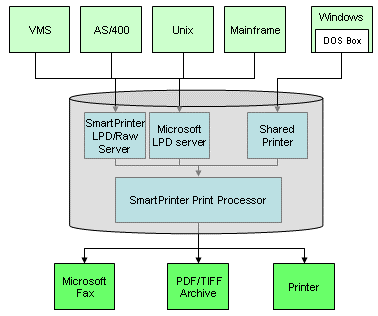
- Share a Windows printer from the server on which the SmartPrinter software is running to a remote computer (this method is usually in use by MS-DOS / Windows applications).
- RAW (9100, or other ports) protocol. It is done by running an internal RAW Server component that listens on the defined ports.
- The software performs a series of manipulations on the original print job, according to a set of predefined rules (for example: replace a certain Epson command with the corresponding PCL command), the result is an alternate print job containing all the changes and new definitions.
- The software then sends the alternate print file to the physical destination printer for the actual print.
It can also send the print job to a fax server for automatic fax sending, or store the print job as a TIFF or PDF files for archive purposes.
|

